


Introduction
The ANCEL X7HD heavy duty truck diagnostic tool is a professional-grade diagnostic platform designed for heavy-duty trucks, commercial vehicles, engines, and selected construction and agricultural equipment.
For users looking for a dedicated truck scanner solution, ANCEL provides professional diagnostic tools designed for different heavy-duty vehicle repair needs.
Unlike basic OBD2 code reader, X7HD integrates full-system diagnostics, bi-directional control, ECU coding, and advanced reset services into a single 10.1-inch Android-based diagnostic tablet.
This FAQ will help you understand vehicle compatibility, diagnostic capabilities, real-world usage, limitations, and ownership value—so you can make a confident purchasing decision.
Value & Cost Savings
Why choose the ANCEL X7HD instead of more expensive brand-exclusive diagnostic tools?
- Supports more than 10,000 models of heavy-duty trucks, commercial vehicles, engines and select construction machinery
- Delivers full-system diagnostics covering engine, ABS, transmission, exhaust after-treatment and other core modules
- Professional-grade service functions including DPF Forced Regeneration and Cylinder Cutout Test are fully supported
How much money can I save by using the X7HD instead of calling roadside repair services?
- Roadside diagnostic calls often cost hundreds of dollars before any physical repair work begins
- Common tasks including DTC reading, fault diagnosis, DPF Regeneration and service resets can be completed on your own without booking a professional technician
- Faster self-diagnostics cut vehicle downtime, avoid revenue losses from delayed deliveries and reduce unnecessary maintenance expenses
What is the difference between X7HD and a basic OBD2 code reader?
The X7HD is not a basic code reader.
Basic OBD2 scanner:
- Reads and clears fault codes only
ANCEL X7HD:
- Full-system diagnostics
- Bi-directional control (active tests)
- ECU coding & programming
- Advanced reset functions (DPF, injector coding, cylinder cut-off, etc.)
- Professional-grade workshop-level functions
In short: X7HD replaces multiple dealer-level diagnostic tools in one system.
Vehicle Compatibility
Does the X7HD work for both heavy trucks and passenger cars?
The ANCEL X7HD is engineered primarily for heavy-duty trucks, diesel engines and specific commercial equipment.
Key Notes:
- Its software architecture and feature set are fully optimized for heavy-duty vehicle workflows
- Passenger car coverage is limited and not its intended primary use case
- If you require simultaneous diagnostics for both passenger vehicles and heavy trucks, select ANCEL’s dedicated dual-purpose scanner models instead, such as V6 Pro+HD. Browse our full range of multi-purpose diagnostic scan tool options to find your match.
Recommendation:
If you need to service both light passenger cars and heavy trucks, contact our support team before purchase for ANCEL product recommendations.
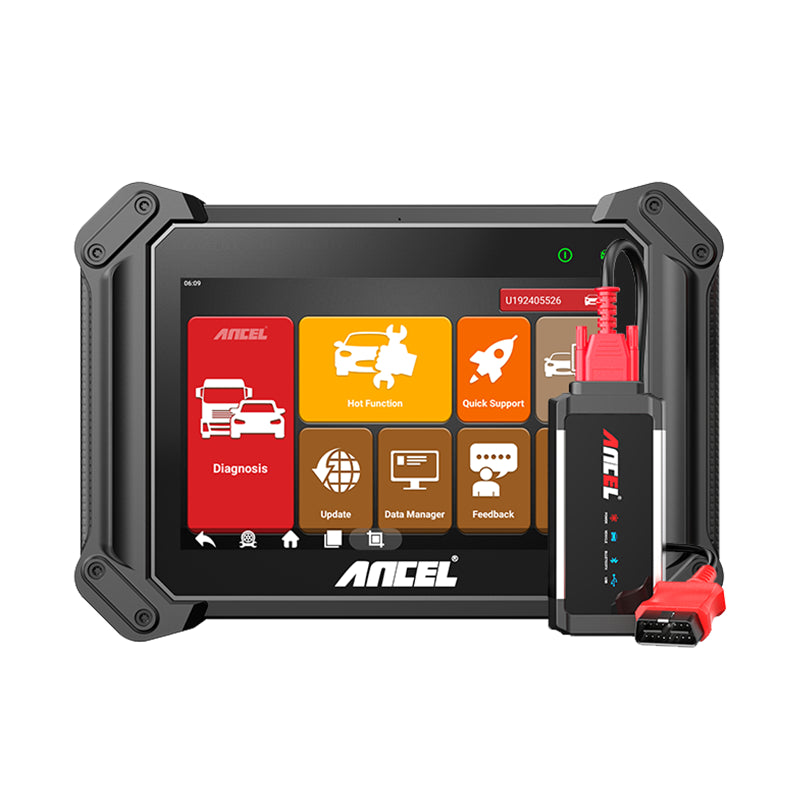
Need Both Heavy Truck & Passenger Vehicle Diagnostics?
Choose ANCEL V6 Pro HD — a versatile diagnostic tablet designed for users who need coverage across heavy-duty trucks, commercial vehicles, and passenger cars.
- Supports both heavy-duty and passenger vehicle diagnostics
- Full-system scan with advanced service functions
- Ideal alternative for mixed vehicle repair needs
I own both trucks plus construction / agricultural machinery — can the X7HD cover all my equipment?
- One single scanner works for heavy trucks, supported construction equipment and agricultural machinery
- Available functions vary by equipment brand, model, production year and ECU control system
- Basic diagnostic functions (DTC read/clear, live data streaming) feature broader universal coverage; advanced features like Bi-directional Control and DPF Regeneration may have restricted compatibility on off-highway equipment
Recommendation:
If construction or agricultural machinery makes up your primary workload, contact our team to confirm full feature compatibility for your specific models before ordering.
What vehicle information should I prepare before contacting ANCEL to verify compatibility?
- Vehicle make
- Exact model
- Production year
- Engine manufacturer & engine model
- VIN (Vehicle Identification Number, if available)
- Specific advanced functions you need to use (DPF Forced Regeneration, injector coding, DPF reset, derate mode clearing, etc.)
Recommendation:
The more detailed information you provide, the faster and more precisely we can confirm compatible features and full vehicle support.
What vehicles are compatible with the ANCEL X7HD?
The X7HD supports a wide range of heavy-duty trucks, commercial vehicles, engines, and selected machinery systems.
Compatible truck brands include:
Freightliner, Kenworth, Peterbilt, Volvo, Mack, International, Scania, MAN, DAF, Hino, Isuzu, Iveco, Renault, Mercedes-Benz, and more.
Engine systems supported include:
Cummins, Caterpillar, Detroit Diesel, PACCAR, Bosch, Weichai, Yuchai, Perkins, and more.
Additional coverage includes:
- Construction equipment (Caterpillar, Komatsu, Hitachi, SANY, etc.)
- Agricultural machinery (John Deere)
- Selected light-duty vehicles (Ford, GM, Toyota, etc.)
⚠️ Compatibility varies depending on vehicle model, year, ECU system, and communication protocol.
Core Diagnostic Functions
Can I use X7HD in remote or offline environments?
- Internet connectivity is only required for software updates and expanding the vehicle model database; regular offline use does not rely on network access
- Ideal for fleet managers and long-haul truck operators to perform instant baseline diagnostics anywhere, with no network limitations
What diagnostic functions does X7HD provide?
X7HD supports full-system diagnostics, including:
- Read/clear DTC fault codes
- Live data stream & waveform analysis
- Freeze frame data
- ECU information reading
- All-system module scanning
Supported systems include:
Engine, ABS, Transmission, SRS (Airbag), Brake System, Fuel System, Aftertreatment System, HVAC, and more than 30+ vehicle systems.
Daily Operation & Usability
Is the X7HD easy to operate? Are daily workflows complicated for new users?
- Large 10.1-inch Android industrial touch tablet for intuitive visual operation
- Dual connection options: Wireless VCI Bluetooth link or wired USB cable
- Auto Scan function to automatically identify full vehicle model & ECU information
- One-Key Update feature to keep software and vehicle databases up to date with one tap
Performance & Hardware
How powerful is the hardware of X7HD?
The X7HD is built on an industrial Android platform:
- 10.1-inch HD touchscreen tablet
- Android 10 system
- High-performance processor
- Stable VCI connection (WiFi + USB)
- Built-in overvoltage protection
Does the X7HD support multiple interface languages?
Are Diagnostic Trouble Codes (DTCs) only displayed in English?
- Standard generic DTCs include matching translated fault descriptions aligned with your selected UI language
- Most menus, functional modules and full diagnostic workflow guides display in your chosen interface language
- Certain manufacturer-exclusive DTCs, module labels and OEM technical data are pulled directly from vehicle ECUs and retained in their original English formatting
Important Note:
This is standard industry practice for all heavy-duty truck diagnostic tools, not a unique limitation of the ANCEL X7HD.
Does X7HD support wireless diagnostics?
Yes.
- Supports Wireless VCI connection
- Also supports USB wired connection
- Stable communication across heavy-duty protocols (J1939, J1708, J1587, CAN, etc.)
Long-Term Software & Ownership Cost
Do I need to renew a software subscription to keep using the X7HD after the free update period expires?
- 2 full years of free online software updates are included with every X7HD purchase
- Subscription renewal is completely optional after the 2-year free window closes
- All existing preloaded diagnostic functions will stay fully usable without an active subscription
- A paid renewal subscription is only required to unlock coverage for newly released vehicle models, software optimizations and newly launched advanced features
Recommendation:
Maintain an active update subscription if you regularly service late-model heavy-duty trucks to guarantee the broadest possible vehicle compatibility.
Does X7HD require software subscription?
No mandatory subscription is required.
- Includes 2 years free software updates
- After expiration:
- Device still works normally
- Updates become optional
After-Sales Support & Warranty
What warranty coverage and support does the X7HD include to protect my purchase?
- 1-year official hardware warranty
- Unlimited free software updates during the 2-year complimentary update window
- Dedicated technical support for device setup, software upgrades, diagnostic guidance and fault troubleshooting
- One-click feedback and diagnostic log submission directly from the X7HD tablet
The X7HD supports over-the-air online updates to continuously deliver expanded vehicle coverage, bug fixes and feature improvements.
Usage Tip:
Avoid hard drops or heavy physical impact during daily operation; store the device in a dry environment and charge it periodically during long periods of inactivity.
Are user manuals, training videos and step-by-step operation tutorials provided?
- Digital electronic user manual pre-installed directly on the scanner tablet
- Official step-by-step video tutorials covering all core common functions and workflows
- Our dedicated customer support team offers assistance with device setup, software updates and technical troubleshooting
After a short learning period, most users master core operations including DTC read/clear, live data stream monitoring and DPF Regeneration independently.
Troubleshooting & Technical Limits
What should I do if Auto Scan runs extremely slowly or fails to establish ECU connection?
- Confirm your X7HD software and vehicle model database are updated to the latest official release
- Double-check that you are using the correct vehicle adapter cable and valid VCI connection method (wireless Bluetooth or wired USB)
- Many older construction, agricultural and vintage heavy vehicles require manual ECU system selection instead of full automatic scanning
- Scan duration varies based on the number of installed control modules and active communication protocols on the target vehicle
Recommendation:
If Auto Scan remains abnormally slow or cannot connect to the vehicle ECU, submit a feedback report directly through the X7HD tablet; our technical team will assist with advanced troubleshooting.
Closing
All questions listed above cover the most common pre-purchase concerns raised by ANCEL X7HD buyers.
If you still have unanswered compatibility, feature or support questions after reviewing this FAQ, contact our customer service team with your full vehicle details for a personalized compatibility check before placing your order.
Take advantage of our limited-time 20% discount to lock in savings on the ANCEL X7HD professional heavy-duty diagnostic tablet today.
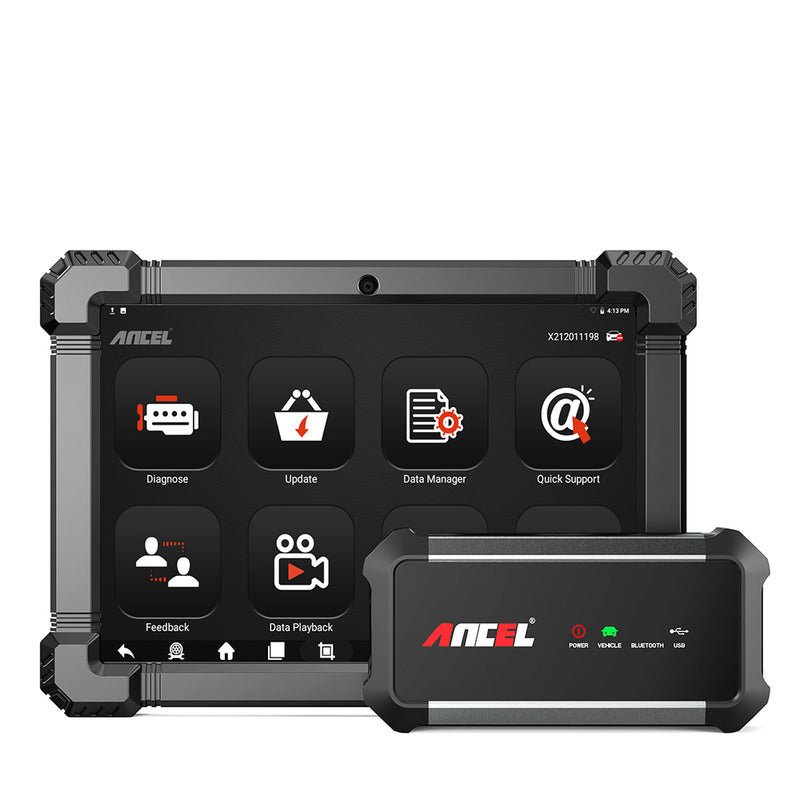
Ready for Professional Heavy-Duty Diagnostics?
- Full-system diagnostics for heavy-duty trucks and commercial vehicles
- Bi-directional control, ECU coding, and advanced service functions
- DPF regeneration and professional maintenance solutions


