


Not sure if the ANCEL HD3600 is right for your equipment?
Unlike standard OBD2 scanners designed primarily for passenger vehicles, the ANCEL HD3600 scanner is built for diagnosing agricultural machinery, construction equipment, and heavy-duty diesel trucks. It helps equipment owners and technicians read fault codes, monitor live data, and perform supported DPF maintenance across different types of machinery.
However, choosing the right heavy equipment scan tool involves more than checking supported brands. You need to know whether it works with your specific machine, supports the functions you need, and fits your maintenance workflow.
Based on common questions from equipment owners and technicians, these HD3600 FAQs address the compatibility concerns, diagnostic limitations, and ownership questions that matter most before purchasing.
Buying Decision & Product Fit
Is the ANCEL HD3600 Right for My Equipment and Diagnostic Needs?
The ANCEL HD3600 is a heavy equipment diagnostic tool designed for agricultural machinery, construction equipment, and heavy-duty diesel trucks. It is particularly suitable for farmers, equipment owners, fleet managers, and independent technicians who maintain different types of diesel-powered machinery and need a practical way to perform routine diagnostics.
Whether it's right for you depends on the equipment you maintain and the diagnostic tasks you need to perform.
The HD3600 may be a good fit if you:
- - Own or maintain different types of equipment: Work with tractors, loaders, excavators, diesel trucks, or other supported machinery.
- - Need to investigate equipment faults: Want to read fault codes, monitor Live Data, and identify potential problems before arranging repairs.
- - Perform regular DPF maintenance: Need DPF Regeneration on compatible equipment that meets the required operating conditions.
- - Want to reduce reliance on external diagnostics: Prefer handling supported diagnostic tasks yourself before deciding whether professional repairs are necessary.
Buying Advice: If you mainly need a specific advanced programming or special service function, confirm compatibility with your exact equipment before purchasing.
Note: The HD3600 is a multi-equipment diagnostic tool, but support varies by machine, ECU, software version, and required function. It is not a replacement for every manufacturer-specific diagnostic tool.
Is the HD3600 Worth Upgrading to From a Basic Code Reader or a Launch Scanner?
- - Compared with a basic code reader: The HD3600 is designed for supported diesel trucks and heavy equipment, offering multiple diagnostic connections, fault code reading, Live Data, and applicable DPF maintenance functions.
- - Compared with professional scanners such as Launch: Compare compatibility with your specific equipment, required functions, included connectors, software update policies, and total ownership costs rather than brand names or feature counts alone.
- - Long-Term Value: The HD3600 includes Lifetime Free Updates, helping reduce recurring software update expenses.
Buying Advice: Upgrading makes more sense if your current tool cannot access the systems, Live Data, or DPF functions you need—and the HD3600 has been confirmed to support those tasks.
Note: Features, compatibility, and update policies vary between individual scanner models. No brand should be assumed to offer broader coverage or lower costs without comparing specific products.
Equipment Compatibility & Connection
Does the HD3600 Work With CAT 930G or 420D Equipment?
The ANCEL HD3600 is a multi-brand diagnostic scanner that supports certain Caterpillar systems. For owners looking for a CAT scan tool, it offers diagnostic capabilities for compatible equipment and includes a CAT-9 cable. However, compatibility with the CAT 930G or 420D must be verified based on the machine's year, engine, control modules, and required diagnostic functions.
If your machine displays a message requiring two diagnostic tools or fails to complete a diagnostic operation, check the following:
- - Connection: Confirm that the diagnostic port matches the selected cable and that the connector is properly seated and powered.
- - Diagnostic Menu: Make sure you have selected the appropriate Caterpillar equipment or system menu, and check whether communication with the target ECU can be established.
- - Required Function: Identify whether you need engine fault codes, access to other machine control modules, or a specific service procedure. Different systems may have different communication requirements.
Important: A message indicating that two tools are required does not automatically mean you must purchase another scanner. However, switching cables or menus is not guaranteed to resolve the issue.
Next Step: If the message persists, send ANCEL Technical Support the complete error screenshot, equipment year, engine model, and diagnostic port photos for further investigation.
Why Can't I Find a Cummins Menu on the HD3600? Can I Use the Komatsu Menu?
The HD3600 provides diagnostic access through equipment manufacturer menus and standard diesel diagnostic functions. Not seeing a separate Cummins menu does not necessarily mean the engine cannot be diagnosed.
However, another manufacturer's menu should not automatically be treated as a substitute.
Choose the diagnostic path based on your equipment:
- - Komatsu or Other Construction Equipment: Start with the menu corresponding to the machine manufacturer. Confirm whether the engine ECU is supported by the available software.
- - Standard Diesel OBD: For equipment using supported diesel diagnostic protocols, you may be able to read standard fault codes and available operating data through the Diesel OBD menu.
- - DPF Regeneration: Check whether the specific machine and engine combination supports the required DPF function. The presence of a DPF menu does not guarantee regeneration support for every Cummins engine.
Buying Advice: If your equipment uses a Cummins engine, provide the machine manufacturer, model, year, engine model, and required diagnostic functions.
Our technical team can help verify the appropriate menu path and available functions before purchase.
Why Won't the HD3600 Connect to My Freightliner With a Detroit Engine?
A communication failure does not necessarily mean the HD3600 is defective. The issue may involve the diagnostic connection, selected software menu, or compatibility with the specific vehicle configuration.
Start with these checks:
- - Check the Connector: Use the appropriate OBDII 16-Pin Cable or DIESEL 6-Pin & 9-Pin Connector supplied with the HD3600, depending on your vehicle's diagnostic port.
- - Check the Connection: Make sure the connector is securely attached and the diagnostic port is receiving power.
- - Select the Correct Menu: Choose the diesel diagnostic menu appropriate for your vehicle and check whether communication can be established.
- - Request Technical Support: If the connection still fails, provide your Freightliner's model year, Detroit engine model, diagnostic port photos, and any error screenshots.
Compatibility Note: The HD3600 supports diesel diagnostic protocols including SAE J1939 and SAE J1708, but successful communication still depends on the vehicle's specific configuration and supported systems.
Buying Advice: If you primarily need the HD3600 for one Freightliner truck, we recommend confirming compatibility with ANCEL Technical Support before purchasing.
What Is the Difference Between the ANCEL HD3600 and X7 HD?
Both the ANCEL HD3600 and X7 HD support diagnostics for compatible heavy-duty diesel vehicles and equipment, including certain agricultural and construction machines. The main difference is their diagnostic capabilities and intended users.
- - ANCEL HD3600 – For Routine Equipment Diagnostics: Designed for farmers, equipment owners, and maintenance operators who need to read and clear fault codes, monitor live data, and perform DPF regeneration on supported machines. It features a 5-inch touchscreen and lifetime free software updates.
- - ANCEL X7 HD – For Advanced Workshop Diagnostics: Designed for professional mechanics and repair shops that need more extensive diagnostic and service capabilities, including supported bi-directional tests, ECU coding, and additional maintenance functions. It features a larger touchscreen and wireless diagnostic connectivity. The X7 HD includes two years of free software updates, with optional paid renewals afterward.
Which should you choose?
- If your main needs are routine troubleshooting, fault code reading, live data monitoring, and supported DPF maintenance, the HD3600 may be sufficient.
- If you frequently perform more complex repairs requiring active tests, ECU coding, or specialized service functions, the X7 HD may be a better fit.
Before purchasing: Neither scanner supports every function on every machine. Confirm compatibility using your equipment's make, model, year, engine, and required diagnostic functions
Diagnostic Functions & Limitations
Can HD3600 DPF Forced Regeneration Fix Recurring DPF Fault Codes?
Not always. DPF Forced Regeneration is designed to burn accumulated soot inside the Diesel Particulate Filter under appropriate operating conditions. It cannot repair every fault in the diesel aftertreatment system.
What should you know?
- - When Regeneration May Help: On supported equipment, the HD3600 can initiate DPF Regeneration when the ECU permits the procedure and all required conditions are met.
- - Recurring Fault Codes: Repeated DPF warnings may indicate underlying problems such as differential pressure sensor faults, excessive ash accumulation, fuel injection issues, or other engine and aftertreatment system faults.
- - If Regeneration Doesn't Resolve the Problem: Read Fault Codes, review relevant Live Data, and investigate the underlying cause before attempting additional regeneration procedures.
Important Limitation: Successfully initiating or completing regeneration does not guarantee that fault codes will disappear or that an engine derate will be removed. The outcome depends on the actual fault and the ECU's operating requirements.
Safety Reminder: DPF Regeneration can generate extremely high exhaust temperatures. Always follow the equipment manufacturer's safety instructions, parking requirements, and regeneration procedures.
What's the Difference Between Reading, Clearing, and Fixing Fault Codes?
Reading fault codes helps identify potential problems, repairing the equipment addresses the underlying cause, and clearing fault codes removes stored diagnostic information.
The HD3600 can assist with troubleshooting and post-repair verification, but clearing a code does not mean the problem has been fixed.
Understanding the difference:
- - Read Fault Codes: Retrieve fault information stored by the ECU and use available Live Data to investigate possible causes.
- - Fix the Problem: Inspect and repair the actual fault, such as damaged wiring, loose connections, or a confirmed faulty component.
- - Erase Fault Codes: After documenting the necessary diagnostic information and completing repairs, clear the relevant codes and check the system again.
How Can You Confirm the Repair?
Use the HD3600 to read fault codes again, review relevant Live Data, and check whether the issue returns under similar operating conditions.
Practical Value: Comparing diagnostic information before and after repairs can help verify the results and reduce unnecessary parts replacement or repeated troubleshooting.
Note: Some faults require specific operating conditions or driving cycles before they reappear. A single scan showing no fault codes does not guarantee that the issue has been permanently resolved.
Should I Replace a Sensor Just Because the HD3600 Shows a Related Fault Code?
Not immediately. A sensor-related fault code indicates an area that needs investigation, but it does not always mean the failed sensor itself.
Possible Causes:
- - A faulty sensor
- - Damaged or disconnected wiring
- - Loose or corroded connectors
- - Power supply or signal circuit problems
Recommended Troubleshooting:
On supported systems, use the HD3600's Live Data function to review available sensor readings. Compare the information with the equipment manufacturer's specifications and inspect the related wiring and connections before replacing parts.
What About Pin Detect?
The HD3600's Pin Detect function is primarily designed to check voltage at the 16-pin OBD diagnostic connector and identify certain communication pin positions, including K-line and CAN connections.
It is not intended to test individual sensor circuits or replace professional electrical measurements.
Bottom Line: Treat fault codes as diagnostic clues, not automatic instructions to replace components. Combining electronic diagnostic information with physical inspections can help avoid unnecessary repair costs.
Can the ANCEL HD3600 Diagnose Systems Beyond the Engine?
Yes. On supported equipment, the ANCEL HD3600 can access multiple electronic control systems, not just the engine.
Depending on the machine and its configuration, available systems may include:
-
Engine: Read fault codes, view live operating data, and investigate engine-related problems.
-
Transmission: Check supported transmission control modules and retrieve available diagnostic information.
-
ABS/EBS: Access braking system fault information where supported.
-
Other Control Modules: Certain machines may provide access to instrument panels, body controllers, chassis systems, or other ECUs.
ECU Topology: The HD3600 also supports ECU topology mapping, providing a visual overview of supported electronic control units and their connections. This helps technicians understand the system layout and navigate complex diagnostic tasks more efficiently. Availability varies by equipment.
Important: Full-system diagnostics does not mean every ECU is accessible on every machine. Coverage depends on the equipment's make, model, year, electronic architecture, and supported diagnostic software.
Buying Advice: If you need to diagnose a specific system beyond the engine, confirm that the HD3600 supports that system on your exact equipment before purchasing.
Setup, Accessories & Support
What Languages Does the HD3600 Support?
The HD3600 currently lists two supported device interface languages: English and Spanish.
Video Subtitles vs. Device Languages
Some promotional or instructional videos may include subtitles in other languages, such as Portuguese or French. These subtitles are provided to help viewers understand the content and do not mean that the HD3600 includes those languages in its software menus.
Before Purchasing
If you require a specific interface language, such as Portuguese, German, or French, please contact ANCEL Technical Support to confirm the latest available language options.
Important: Video subtitles and translated promotional materials should not be used as proof of supported device interface languages.
Does the HD3600 Come With a Hard Carrying Case?

No. The standard HD3600 package currently lists a carton rather than a hard carrying case.
Standard Package Contents:
- - HD3600 Scanner × 1
- - OBDII 16-Pin Cable × 1
- - DIESEL 6-Pin & 9-Pin Connector × 1
- - CAT-9 Cable × 1
- - User Manual × 1
- - Carton × 1
Before Purchasing: If you need a hard carrying case, check whether it is included in your selected bundle or promotional offer.
After Purchasing: If your order specifically included a carrying case but you did not receive it, contact ANCEL Customer Support with your order number and screenshots of the applicable product listing or promotion.
Our team can help verify whether the case was omitted or shipped separately.
Note: Accessories offered through special bundles or promotions should not be assumed to be included with every standard HD3600 purchase.
What Information Should I Provide if My HD3600 Won't Connect or a Function Doesn't Work?
If you experience connection problems or cannot access a required diagnostic function, providing detailed equipment information and screenshots can help our technical team investigate the issue more efficiently.
Please prepare the following information:
-
Equipment Details: Manufacturer, model, year, engine model, and the specific diagnostic function you need.
-
Connection Details: Photos of the diagnostic port and connected cable, along with your HD3600 software version.
-
Problem Evidence: Error screenshots, the menu where the issue occurred, and the troubleshooting steps you have already tried.
How to Submit Your Issue:
-
Feedback Function: Connect the HD3600 to Wi-Fi and use its built-in Feedback function to submit diagnostic problems.
-
Email Support: Contact ANCEL Technical Support at support@ancel.com with the relevant information and attachments.
Providing these details helps our team identify possible compatibility, communication, or software-related issues and recommend appropriate next steps.
Is the ANCEL HD3600 Portable and Easy to Use Without a Computer or Internet Connection?
Yes. The ANCEL HD3600 is a compact, standalone diagnostic scanner designed for on-site use in farms, construction sites, workshops, and other equipment maintenance environments. It does not require a separate phone, computer, or continuous internet connection for supported diagnostic operations.
-
5-Inch Touchscreen: The Android-based interface lets you navigate diagnostic menus, read fault codes, and monitor Live Data directly on the device.
-
Standalone Diagnostics: Once activated and equipped with the required software, the HD3600 can perform supported diagnostic functions without a phone, computer, or active internet connection.
-
Multiple Diagnostic Connectors: The included OBDII 16-pin cable, diesel 6/9-pin connector, and CAT-9 cable allow connection to different diagnostic ports on compatible equipment.
-
Wi-Fi Updates: Wi-Fi is required for initial activation, downloading software updates, and certain online features. The HD3600 includes lifetime free software updates.
Practical Value: Its compact design and offline diagnostic capabilities make it convenient for equipment owners and technicians who need to troubleshoot machinery directly in the field, even where internet access is limited.
Note: Available diagnostic functions depend on the specific equipment, ECU, and installed software. Confirm compatibility before purchasing.
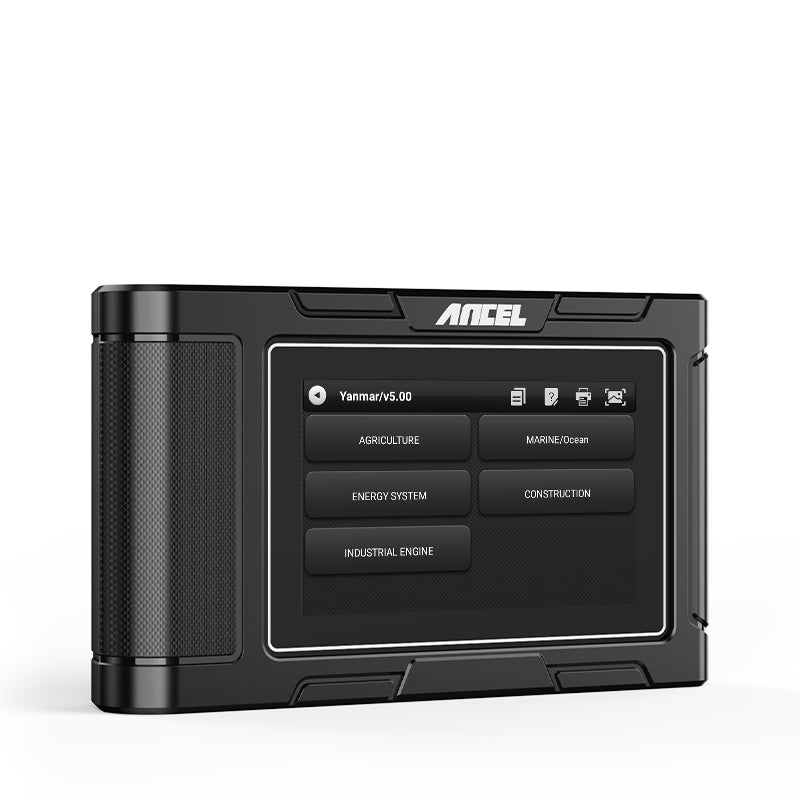
ANCEL HD3600
Diagnose supported agricultural machinery, construction equipment, and heavy-duty diesel trucks with one standalone tool.
Explore ANCEL HD3600Check compatibility with your equipment before ordering.


