ANCEL BM700 Pro Full System Car Scanner CBS ABS ASC Reset For BMW

  • Full-System BMW Diagnosis: Deep access to BMW control modules beyond basic OBDII
  • Live Data Monitoring: View real-time vehicle data to spot issues instantly
  • One-Click I/M Readiness: Instant emissions status check for inspection readiness
  • DME/DDE Special Functions: Execute essential engine resets and adaptations
  • 14+ Service Reset Functions: Oil, EPB, Battery, Throttle and more—model dependent

  • Auto VIN Detection: Automatically identifies vehicle for faster diagnostics
  • Lifetime Free Updates: No subscriptions, always compatible with new model
  • Compact & Portable Design: Professional BMW diagnostics in a handheld device
$154.99 USD $123.99 USD SAVE 20%

Model: BM700 Pro

BM700 Pro
BM700

paypalvisavisaelectronmastermaestrodiners clubjcbdiscoveramerican expressunionpayshopify payapple paygoogle payklarnabancontactideal
Shipping Policy
Enjoy Free US. Shipping or Upgrade to 1–2 Day Express. We ship from local warehouses first. If unavailable, orders may dispatch from other warehouses; customs clearance and duties may apply. See details in our Shipping Policy.
What's in the Box
BM700 Pro Scan Tool with 16 Pin Cable *1
Dust-proof bag for bmw scan tool *1
USB Cable *1
Quick Guide *1
User Manual *1
BM700 Pro Update & Feedback Guide
BM700 Pro: Steps to Update (Windows11)

Please visit the official website (www.anceltech.com). First, register an account on our website and log in. Find the "Download" option in the navigation bar, enter the device model "BM700 Pro", and click on the latest version of the upgrade package to download.
The upgrade steps are as follows:

1.Connect your device to a computer using a Type-C cable.

2.Unzip the downloaded update package and open the "AncelAssist.exe" tool in the package.

3.Enter the Download Center and you can see the local version number and the latest version number.

4.Select the upgrade package to be installed and click "Update" in the upper left corner.

5.Installation complete.


BM700 Pro: Steps to Submit Feedback (Windows11)

Please visit the official website (www.anceltech.com).
First, register an account on our website and log in. Find the "Download" option in the navigation bar, enter the device model "BM700 Pro", and click on the latest version of the upgrade package to download.
Feedback steps are as follows:

1.Connect your device to a computer using a Type-C cable.

2.Unzip the downloaded update package and open the "AncelAssist.exe" tool in the package.

3.Enter the Feedback Center and fill in the vehicle information and the problem in detail.

4.Click to upload attachment.

5.Open the "BsSys" folder of the BM700 Pro memory manager on your computer and select the "FEEDBACK.BIN" file to upload.

6.Click the "Submit" button to complete the feedback.

Fast Delivery in 1-5 business Days

30-Day Hassle-free Returns

1-Year Warranty Protection

ANCEL BM700 Pro ANCEL BM700 Pro

BMW Diagnostics. Reinvented for DIYers.

ANCEL BM700 Pro Full System ANCEL BM700 Pro Full System

Full-System Deep Diagnosis for BMW

ANCEL BM700 Pro live data ANCEL BM700 Pro live data

Live Data Stream Monitoring

ANCEL BM700 Pro auto VIN ANCEL BM700 Pro auto VIN

Auto VIN Detection

ANCEL BM700 Pro DMEDDE Engine ANCEL BM700 Pro DMEDDE Engine

Engine Fault Diagnosis & Code Clearing

ANCEL BM700 Pro IM readiness check ANCEL BM700 Pro IM readiness check

One-Click I/M Readiness Check

ANCEL BM700 Pro free update ANCEL BM700 Pro free update

Lifetime Free Update

ANCEL BM700 Pro 14+reset ANCEL BM700 Pro 14+reset

14+ Maintenance Services

ANCEL BM700 Pro full system ANCEL BM700 Pro full system
ANCEL BM700 Pro full system ECM

Engine Control System

Reads engine faults, live data, and ECU information for accurate engine diagnostics.

ANCEL BM700 Pro full system EME

Electric Motor Control System

Diagnoses electric motor control and related components on hybrid or electric BMW models.

ANCEL BM700 Pro full system EKPS

Electronic Fuel Pump Control

Monitors and tests the electronic fuel pump system for proper fuel delivery.

ANCEL BM700 Pro full system EGS

Transmission Control System

Monitors transmission operation and clears gearbox-related fault codes.

ANCEL BM700 Pro full system DSC

Brake & Stability Control System

Diagnoses braking and vehicle stability systems to ensure driving safety.

ANCEL BM700 Pro full system Airbag

Airbag Safety System

Reads and clears airbag system faults to maintain occupant protection.

ANCEL BM700 Pro full system INSTER

Instrument Cluster System

Accesses dashboard warnings, mileage data, and system status information.

ANCEL BM700 Pro full system CAS

Car Access & Immobilizer System

Diagnoses vehicle authorization and immobilizer-related systems.

ANCEL BM700 Pro full system FZD

Roof & Interior Control System

Manages and diagnoses roof, lighting, and interior electronic functions.

ANCEL BM700 Pro full system SVT

Vehicle Configuration & Module Topology

Reads vehicle configuration data and control unit structure.

Smart Auto VIN

The BM700 Pro car scanner features automatic VIN recognition, allowing it to instantly identify your vehicle's make, model, and year.

With just one click, you can enter diagnostic mode.

ANCEL BM700 Pro auto VIN ANCEL BM700 Pro Auto VIN

14+ Maintenance Services

BM700 Pro supports key service features like Battery Registration, Oil Reset, EPB Reset, DPF Regeneration, Throttle Adaptation, Injector Coding, and more—

making it ideal for DIY users and professional technicians working on BMW, MINI, and Rolls-Royce vehicles.

Common Reset Functions

BM700 Pro features built-in quick access to essential maintenance resets, including Battery Reset & Registration, Oil Service Reset, EPB Reset, and Throttle Adaptation.

These commonly used functions are available directly from the menu and are supported across a wide range of BMW, MINI, and Rolls-Royce models—allowing users to perform routine maintenance quickly and easily without complicated setup.

Battery Reset & Registration

Resets and registers a new battery after replacement to ensure proper charging and battery management.

This function records the new battery in the vehicle system, clears battery-related warnings, optimizes charging performance, and helps extend battery life.

Oil Service Reset

Resets the oil life reminder after an oil change to clear the dashboard maintenance warning.

Allows the vehicle to recalculate the next optimal oil change interval based on driving conditions, helping keep engine performance and maintenance on track.

EPB Reset (Electronic Parking Brake)

Releases the electronic parking brake for brake pad replacement and resets the brake system after service.

Simplifies brake maintenance, ensures proper EPB operation, and improves safety by correctly resetting the electronic brake system.

ETC Reset (Electronic Throttle Control)

Recalibrates the electronic throttle after cleaning or replacement to restore smooth idle and responsive acceleration.

Resets throttle adaptation values to help eliminate rough idle, delayed response, and unstable acceleration.

14+ BMW Special Reset Functions

In addition to the common resets, BM700 Pro provides access to a wide range of advanced special service functions.

Availability of these functions depends on the vehicle model, chassis, and control unit configuration, as different BMW platforms support different service procedures. The tool automatically identifies supported functions based on the selected vehicle, ensuring accurate and safe operation.

If you are unsure whether a specific function is supported for your vehicle, feel free to contact us to confirm compatibility before use.

Battery Reset

Battery Reset

Oil Service Reset

Oil Service Reset

EPB Brake Reset

EPB Brake Reset

Throttle Adaptation

Throttle Adaptation

CBS Service Reset

CBS Service Reset

Control Unit Reset

Control Unit Reset

Engine Control (ECM)

Engine Control (ECM)

Transmission Control

Transmission Control

Transfer Case Reset

Transfer Case Reset

Battery Management

Battery Management

Steering Angle Calibration

Steering Angle Calibration

Clear Adaptation Data

Clear Adaptation Data

ABS / DSC Reset

ABS / DSC Reset

TPMS Reset

TPMS Reset

Fuel Pump Control

Fuel Pump Control

Immobilizer Reset

Immobilizer Reset

Steering Lock Reset

Steering Lock Reset

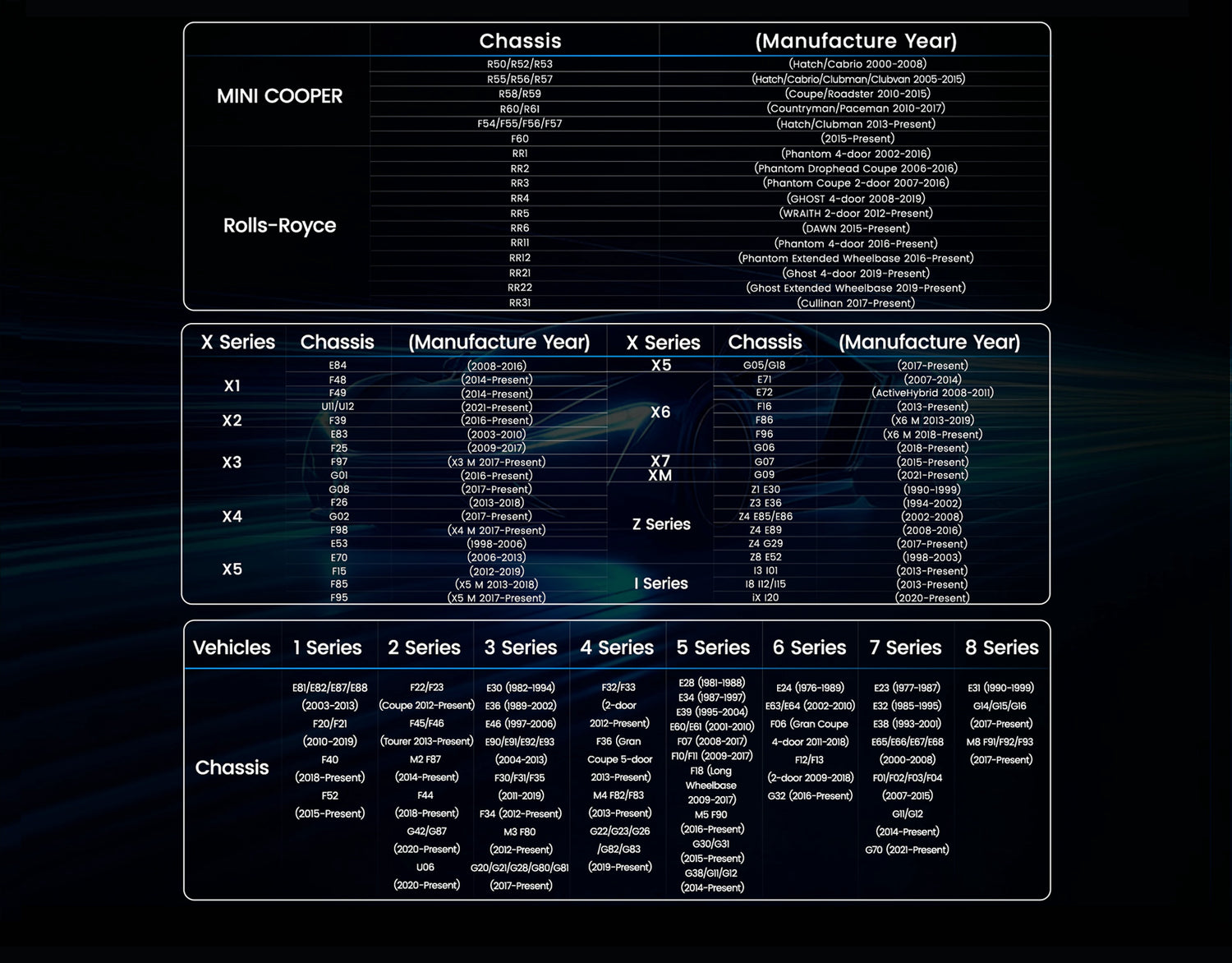
One Tool. Triple Brand Support.

No need for multiple scanners — BM700 Pro supports BMW, MINI, and Rolls-Royce vehicles in one device.

Whether you're a DIY user or a professional tech, it gives you dealership-level access to key modules like DME, DSC, CAS, and more.

ANCEL BM700 Pro Vehicle list ANCEL BM700 Pro Vehicle list

Full OBDII Modes & Wide Compatibility

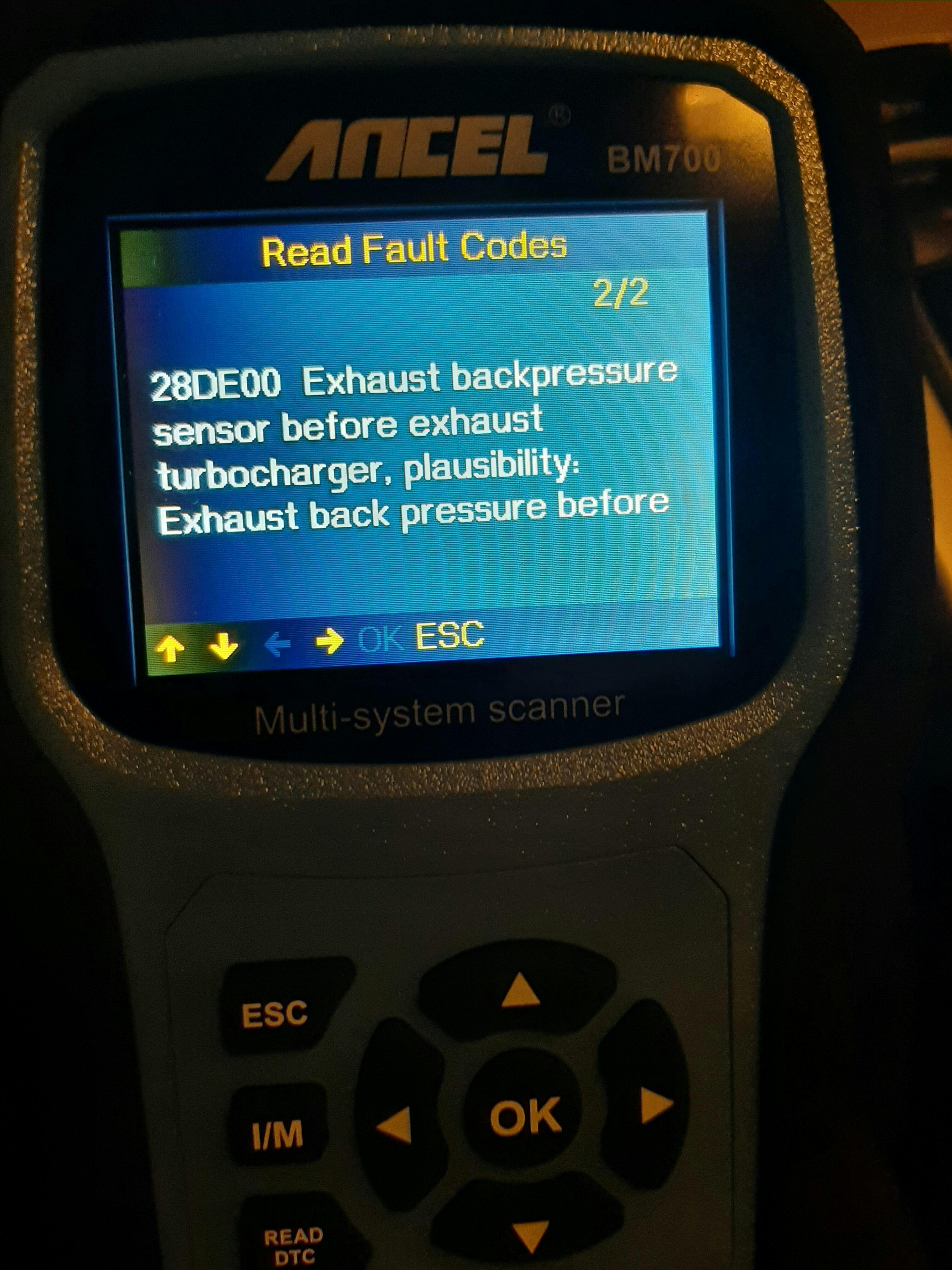
Allows you to easily diagnose engine problems and turn off the warning light. It can not only accurately determine codes and possible causes, but also perform OBD test modes such as live data stream, EVAP system test. Live parameters display sensor data of your vehicle in order to better understand your car. The BM700 Pro give you the power to make more informed decisions at the repair shop.

ANCEL BM700 Pro full OBD2 function ANCEL BM700 Pro full OBD2 function

The BM700 Pro is also one of the most compatible OBD-I OBD-II scanners, supporting both modern as well as older car models of BMW from 1987-1996 with OBD I ports. Works with every gas-powered vehicle 1996 and newer.

Designed for Everyday Use

Switch freely between day & night display modes, support 12 languages, and enjoy lifetime free updates—built for global BMW owners and long-term use.

ANCEL BM700 Pro day and night

Switchable Day/Night Modes

Clear display in any light condition—perfect for indoor garages or roadside repairs.

ANCEL BM700 Pro 12 languages

Support 12 Languages

English, French, Spain, Russian, Italy, Portugal, German, Suomalainen, Polish, Dansk, Svenska, Noska Sprak

ANCEL BM700 Pro free update

Lifetime Free Update

The BM700 Pro supports lifetime free software upgrades, new parameters, functions and the latest vehicle data are constantly updated via the USB2 port over the Internet.

ANCEL BM700 Pro support

Lifetime Tech Support

You can submit your issues with detailed files & attachments in real-time. ANCEL professional technician will reply you after check the details.

What's in the Box

ANCEL BM700 Pro package list ANCEL BM700 Pro package list