


This FAQ covers the most common questions about the ANCEL DS600 BT that go beyond basic product specifications, including ECU coding limitations, vehicle coverage, AutoAuth, Bluetooth diagnostics, internet requirements, troubleshooting, and long-term ownership.
Before You Buy: Product Fit & Upgrade Decision
What’s the Difference Between the DS600 BT and a Basic OBD2 Scanner?
- A basic OBD2 scanner mainly handles engine emissions-related trouble codes.
- On supported vehicles, the DS600 BT can access multiple systems, including the engine, transmission, ABS, SRS, and BCM, to read fault codes, view live data, and retrieve ECU information.
- Bidirectional active tests and service functions help verify component responses and perform supported resets or relearns after repairs.
If you regularly need to move from reading a code to identifying the underlying problem, the DS600 BT offers more diagnostic capability than a basic code reader. Available systems, data, and functions vary by vehicle.
Can the DS600 BT Replace a Dealer Scan Tool?
Not completely. The DS600 BT brings many common professional diagnostic tasks into independent repair shops and home garages.
- On supported vehicles, it provides full-system scans, live data, bidirectional active tests, and selected reset and relearn functions.
- These capabilities can reduce the need for dealer visits for routine diagnostics and certain post-repair procedures.
OEM online programming, reflashing, manufacturer-server access, security authorization, and proprietary guided procedures may still require an OEM account or dedicated equipment. Shops that regularly perform these tasks can use the DS600 BT as their main multi-brand diagnostic tool while retaining the necessary OEM resources.
DS600 BT vs. DS600 Elite: What’s the Difference?
The car scanner DS600 BT and DS600 Elite share the same core hardware, software, and supported diagnostic functions. The main difference is how they connect to the vehicle.
- DS600 BT: Uses a Bluetooth VCI, allowing you to carry the tablet around the engine bay, wheels, or other areas of the vehicle.
- DS600 Elite: Uses a wired OBD diagnostic connection and provides the same diagnostic functions.
Choose the DS600 BT if freedom of movement matters to your workflow.
Choose the DS600 Elite if you prefer a wired connection.
Relevant reading: Diagnostic Tool with Bluetooth: Why ANCEL DS600 BT is the Ultimate Tool for Car Enthusiasts
ECU Coding, Programming & Module Replacement
Does the DS600 BT Support ECU Coding?
No. The DS600 BT does not support ECU coding.
Its main capabilities include full-system diagnostics, bidirectional control, live data, and 34 maintenance and reset functions.
Some vehicles may offer supported reset, relearn, adaptation, or initialization procedures. Availability depends on the make, model, year, and control module. These service functions should not be interpreted as general ECU coding or ECU programming capability.
Can the DS600 BT Program or Reflash a Replacement ECU, PCM, or ABS Module?
No. The DS600 BT does not support ECU coding, online programming, module programming, or software reflashing. It cannot serve as a complete programming tool for replacement ECU, PCM, or ABS modules.
These terms describe different operations:
- Coding / Configuration: Configuring module parameters or vehicle features.
- Programming / Reflash: Writing or updating a control module’s software or firmware.
- PMI: An OEM module-installation procedure used by some manufacturers. It may include configuration, initialization, and programming.
After module replacement, the DS600 BT may perform individual steps if the vehicle only requires a supported reset, relearn, adaptation, initialization, or bidirectional test.
If the procedure requires reflashing, online programming, or an OEM-specific PMI programming process, you will need equipment that supports those operations.
The DS600 BT’s core capabilities remain full-system diagnostics, bidirectional control, 3,000+ active tests across its software database, and maintenance and reset functions.
Vehicle Compatibility, AutoAuth & Regional Use
Does 106 Car Brands or 99% Compatibility Mean Every Function Works on My Vehicle?
No. “106 Car Brands” and “99% Vehicle Compatibility” describe the breadth of the vehicle database, not universal support for every function on every vehicle.
Available functions depend on the model year, engine, ECU, and vehicle configuration.
- Diagnostic access and available data can differ across systems such as the engine, ABS, TCM, BCM, and SRS.
- Active tests, resets, relearns, and system access also depend on the vehicle’s ECUs and manufacturer security requirements.
These coverage figures help indicate the tool’s suitability for multi-brand diagnostics. If a particular advanced function is your main reason for buying, please be sure to confirm with our customer service team(support@ancel.com) using your VIN and the exact function you need.
What Is AutoAuth, and Why Do Some 2018+ FCA Vehicles Need It?
Some 2018 and newer FCA vehicles, including certain Chrysler, Dodge, Jeep, and Ram models, use a Security Gateway to protect operations such as clearing codes, running active tests, and performing certain service functions.
The DS600 BT supports AutoAuth access to these protected functions when the required account and authorization conditions are met.
- Basic diagnostic access and protected operations may have different permission requirements.
- AutoAuth is an independent third-party authorization service and may require registration and a subscription.
If you mainly work on 2018+ FCA vehicles, consider AutoAuth account requirements and fees alongside vehicle and function compatibility when evaluating the tool’s total operating cost.
Can I Use the DS600 BT Outside the U.S.? What Languages Does It Support?
Yes. The DS600 BT supports use outside the U.S. and offers 28 languages.
- You can diagnose vehicles and update the tool using the appropriate vehicle software for your market.
- The same model may have different ECUs, emissions configurations, or security requirements in different markets, so function availability can vary by the vehicle’s original sales region.
- Some ECU descriptions, DTC text, or third-party authorization pages may remain in English or the manufacturer’s original language.
Before purchasing, confirm your required language and the sales region of the vehicles you plan to service.
Wireless Diagnostics & Daily Workflow
What Is the Benefit of Bluetooth Diagnostics on the DS600 BT?
Bluetooth lets you run diagnostics away from the driver’s seat while keeping the tablet connected to the vehicle through the VCI. During supported active tests, you can stand near the engine bay or wheels and directly observe component responses.
If the connection becomes unstable, check:
- VCI connection: Ensure the adapter is securely plugged into the diagnostic port.
- Vehicle power: Confirm the vehicle’s battery voltage is adequate.
- Wireless conditions: Move closer to the VCI and check for interference.
- Diagnostic software: Keep the scanner software and installed vehicle diagnostic packages up to date.
Can I Use the DS600 BT Without Wi-Fi?
Yes. Many diagnostic tasks can run without a live internet connection once the required vehicle software is installed. These include vehicle communication, reading codes, viewing data, and certain supported functions.
Internet access is typically required for:
- Device and vehicle-software updates.
- Online DTC database access.
- AutoAuth Security Gateway authorization.
- Remote support.
If you often work without Wi-Fi, update the device and your commonly used vehicle software beforehand. If a specific advanced or gateway-protected function is essential, confirm whether it requires online authorization.
Is the DS600 BT Difficult to Use? What If I Can’t Find a Function?
The DS600 BT offers many functions, but the basic workflow is straightforward: identify the vehicle, enter the relevant system or ECU, and select a diagnostic or service function.
Before first use, update the device and the software for the vehicle brands you commonly service.
If you cannot find a function:
- Try manual vehicle selection if Auto VIN fails.
- Confirm that you are in the correct ECU or Service menu.
- Update the software for that vehicle brand.
- If the function is still missing, send your VIN, software version, and a screenshot of the current menu to ANCEL support(support@ancel.com).
This helps determine whether the function is located under a different menu or is not currently supported on that vehicle.
Setup, Troubleshooting & Long-Term Ownership
What Should I Do If Auto VIN Fails or the DS600 BT Cannot Communicate With My Vehicle?
An Auto VIN or initial communication failure does not necessarily mean the vehicle is unsupported. Try these checks in order:
- Make sure the VCI is firmly connected and the vehicle has the correct ignition state and normal voltage.
- Check the Bluetooth and VCI connection status.
- Update the device and the software for the vehicle brand.
- If Auto VIN fails, manually select the make, year, and model/engine.
- Try accessing the target ECU again.
If communication still fails, send your VIN, software version, and diagnostic logs or error screenshots to ANCEL support(support@ancel.com). These details help identify whether the issue involves vehicle coverage, a Security Gateway, or the connection itself.
Is the DS600 BT Suitable for Long-Term Shop Use? What Should I Check After Unboxing?
The DS600 BT is intended for professional repair work and frequent multi-brand diagnostics, making it suitable for ongoing shop use.
After unboxing, take a few minutes to check:
- Screen display and touchscreen response.
- Charging, Wi-Fi, and Bluetooth operation.
- VCI connection.
- A complete scan on a vehicle you regularly service.
If you notice persistent display, connection, or hardware problems, keep your order details, device serial number, and photos or videos of the issue. Contact the original seller or ANCEL support (support@ancel.com)promptly so the problem can be assessed without repeatedly changing settings.
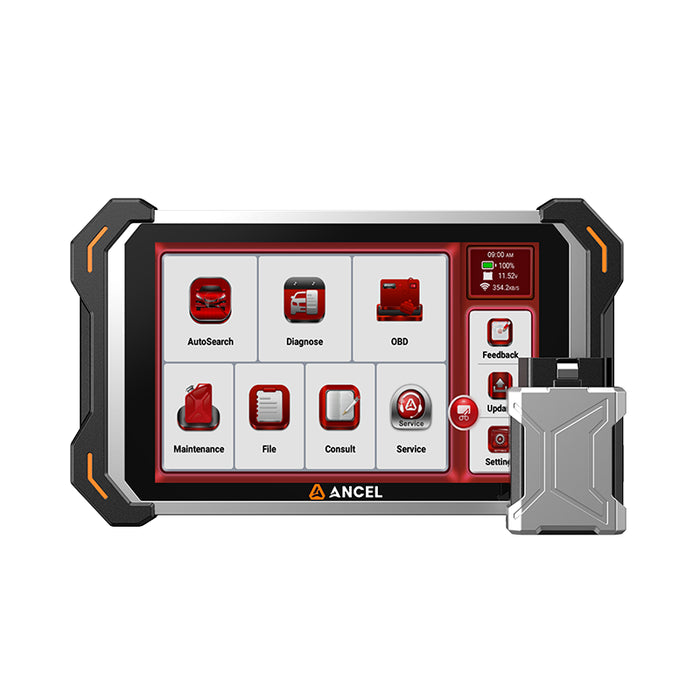
Go Beyond Basic Code Reading
Explore the ANCEL DS600 BT for full-system diagnostics, live data, and supported active tests with the freedom of Bluetooth connectivity.
Explore the DS600 BTFunction availability varies by vehicle. Confirm your VIN and required functions before purchasing.
Conclusion
The DS600 BT is a practical upgrade for drivers and technicians who need full-system diagnostics, active tests, and supported service functions with Bluetooth flexibility.
Before buying, confirm the functions you need for your specific vehicle.
If you’re unsure, send ANCEL support your VIN and the exact task you want to perform.
Read our user review for our DS600 BT.


