


When your vehicle's check engine light comes on, it's often a source of anxiety.
You might immediately wonder if it's a minor issue, like a loose gas cap, or something more serious that needs urgent attention.
While modern vehicles are equipped with On Board Diagnostic (OBD2) systems, and using a professional scanner to pull diagnostic trouble codes (DTCs) is the preferred method, you can actually check these codes without a scanner in many cases.

Check Engine Codes Without a Scanner
Not everyone has access to the OBD2 scanner, but that doesn’t mean you’re entirely helpless.
Here are some methods you can use to retrieve your check engine light codes without needing specialized equipment.
1. The Ignition Key Method
One of the most common methods for retrieving check engine light codes without a scanner involves using the ignition key. This method works on most Chrysler, Dodge, Jeep, and some other vehicles, though it may not work for all models.
Steps:
-
Insert your key into the ignition.
-
Turn the key to the 'ON' position (without starting the engine).
-
Cycle the key between the 'ON' and 'OFF' position three times.
-
On the third cycle, leave the key in the 'ON' position.
-
The check engine light will begin to flash.
-
Count the number of flashes. These flashes will correspond to the DTC codes. The codes are usually 2-digit or 4-digit numbers. If the light flashes two times, pauses, then flashes four times, it represents the code "24."
-
Cross-reference the code with a diagnostic chart, which can be found online or in your vehicle's manual.

Does the Key-Cycle Method Work on Jeep or Ford Vehicles?
The ignition key method is available on certain older Chrysler, Dodge, and Jeep vehicles, but support varies by model and year.
Depending on the vehicle, a supported model may display a diagnostic code on the odometer or communicate it through check engine light flashes.
If your Jeep displays a code, record it before clearing the light and use the code as a starting point to diagnose the underlying issue rather than replacing parts immediately.
For most Ford F-150 models, the same key-cycling procedure is not a reliable way to retrieve engine trouble codes. A compatible OBD2 scanner is generally required.
Always verify the diagnostic procedure for your exact make, model, and year before relying on a manual code-reading method.

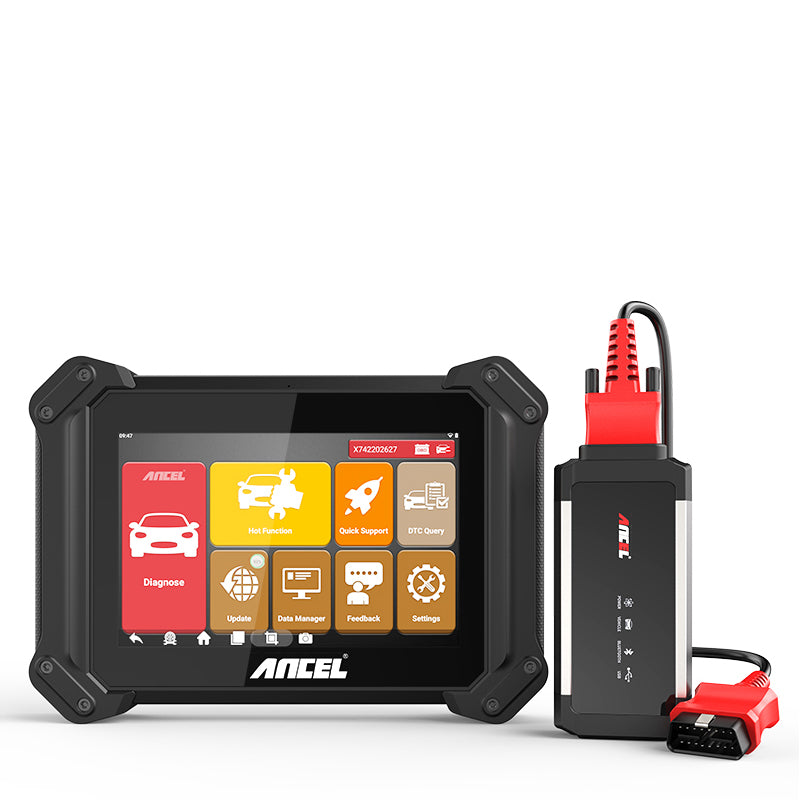 ANCEL V6 PRO+ Bluetooth Bidirectional Scan Tool Full System Car Diagnostic Tool Key Programmer
$439.99
Honestly, owning a car scan tool doesn’t have to break the bank.
If all you need is a simple, reliable tool to detect and clear codes, the ANCEL AD410 is a great budget-friendly option at just $49.
It’s perfect for car owners who want a no-hassle solution without spending too much.
On the other hand, if you’re looking for more advanced diagnostics, similar to what a professional mechanic might use, the ANCEL V6 PRO is an excellent choice.
Priced at $439.99, it comes packed with features like real-time data, ECU coding, and comprehensive system scans.
Whether you’re a beginner needing something basic or a car enthusiast looking for professional-grade capabilities, both options strike the perfect balance between ease of use and functionality, making vehicle maintenance a whole lot easier.
Related Reading: Can Obd Scanner Damage Car
2. The Odometer Method
For vehicles that display codes on the odometer, this method is straightforward. Many Chrysler, Dodge, and Jeep vehicles support this feature.
Steps:
-
Turn the ignition to 'ON'.
-
Press the odometer trip reset button.
-
Hold the button down and turn the key to the 'ON' position.
-
The vehicle's odometer will now display any trouble codes instead of mileage.
3. Dashboard Diagnostic Mode
Many modern vehicles have a dashboard diagnostic mode that can be accessed without a scanner. This mode can provide you with insight into any stored codes or pending issues.
Steps:
-
With the car off, press and hold the trip odometer reset button.
-
Turn the ignition to 'ON' while continuing to hold the button.
-
The dashboard will enter diagnostic mode and display trouble codes on the odometer or infotainment screen.
Pro Tip: Not every dashboard diagnostic mode can display engine trouble codes. Some only test the instrument cluster, gauges, or warning lights, so no displayed code does not necessarily mean there are no stored or pending DTCs. Always confirm whether your specific make, model, and year support manual code retrieval.
4. Jumper Wire Method for Older Vehicles
If you own an older vehicle, specifically one that uses the OBD-I system (used before 1996), you can use a jumper wire to retrieve the codes. This method is most commonly used on GM and Honda vehicles.
Steps for GM vehicles:
-
Turn the ignition to 'OFF'.
-
Locate the diagnostic connector under the dashboard.
-
Insert a jumper wire between the A and B terminals of the diagnostic connector.
-
Turn the key to 'ON' but do not start the engine.
-
The check engine light will begin flashing.
Steps for Honda vehicles:
-
Find the diagnostic connector (usually under the passenger side dashboard).
-
Insert the jumper wire into the connector.
-
Turn the ignition key to 'ON'.
-
The check engine light will flash, revealing the DTC.
5. Paperclip Method for GM Vehicles
The paperclip method is specifically for older GM vehicles that have an ALDL (Assembly Line Diagnostic Link). This method doesn’t require a specialized scanner, just a paperclip.
Steps:
-
Locate the ALDL connector under the dashboard.
-
Bend a paperclip into a U-shape.
-
Insert the ends of the paperclip into terminals A and B on the connector.
-
Turn the key to 'ON' (without starting the car).
-
The check engine light will flash, similar to the jumper wire method.
-
Count the flashes to determine the trouble code.
GM, Chevy, and GMC — OBD-I vs. OBD2
The paperclip and jumper-wire methods apply only to certain older GM, Chevrolet, and GMC vehicles equipped with a compatible ALDL or OBD-I diagnostic system.
They should not be treated as a universal way to read OBD2 codes.
For most 1996 and newer U.S.-market GM passenger vehicles, engine diagnostic trouble codes are accessed through the standardized 16-pin OBD2 connector with a compatible code reader or scan tool.
If your vehicle has a 16-pin OBD2 port, do not short terminals unless the manufacturer’s service information specifically instructs you to do so.
6. Get a Free Code Reading at an Auto Parts Store
If your vehicle does not support manual code retrieval and you do not own an OBD2 scanner, some auto parts stores may offer free check engine light code reading.
They can provide the DTC, but this is not a complete diagnosis. Record the exact code before clearing it, as further testing may still be needed to find the actual cause.
Can You Check Engine Codes Without a Scanner on Toyota, Nissan, Hyundai, Kia, or Mazda?
Whether you can retrieve engine codes without a scanner depends on your vehicle's diagnostic system, model, and year.
Some older vehicles support manufacturer-specific self-diagnostic procedures, while most modern OBD2 vehicles require a compatible scanner to read diagnostic trouble codes.
| Car Brand | Can You Read Codes Without a Scanner? | What to Know |
|---|---|---|
| Toyota | Some older models | Certain older Toyota vehicles support flash-code diagnostics through specified diagnostic terminals, such as TE1 and E1. Always verify the factory procedure. |
| Nissan | Certain models | Some older Nissan vehicles have an accelerator-pedal-operated self-diagnostic mode. The procedure and code display vary by model and year. |
| Hyundai | Limited options | Most models require an OBD2 scanner for direct code retrieval. Some Bluelink-equipped vehicles offer built-in diagnostic information, although this may not display complete DTCs. |
| Kia | Generally requires a scanner | There is no universal ignition-key or dashboard procedure for retrieving engine trouble codes across Kia models. |
| Mazda | Some older models | Certain older vehicles have model-specific diagnostic procedures, but modern OBD2 models generally require a code reader. |
Pro Tip: Always identify your vehicle's make, model, year, and diagnostic system before attempting a scanner-free method. A procedure that works on one model may not work on another, even within the same brand.
For older supported Nissan vehicles, the built-in self-diagnostic procedure may help retrieve basic engine codes, while a compatible OBD2 scanner is usually the more reliable option for modern models and pending or stored codes.
Risks of Checking Engine Codes Without the Proper Method
Manual code-reading methods can be useful, but they are not universal.
-
Do not short random OBD2 terminals. Jumper-wire and paperclip methods apply only to specific older diagnostic systems.
-
Do not assume dashboard self-test means engine diagnostics. Some modes only test the instrument cluster.
-
Avoid clearing codes before recording them. Stored and pending DTCs can provide useful information for troubleshooting.
-
Be cautious with battery resets. Disconnecting the battery may reset readiness monitors and other vehicle settings without fixing the underlying fault.
When you are unsure whether a manual procedure applies to your vehicle, using a compatible OBD2 scanner is the safer and more reliable option.
Interpreting the Codes
Once you have retrieved the DTCs, it’s essential to know what they mean. Diagnostic trouble codes follow a standardized format:
-
P0xxx: General powertrain issues
-
P1xxx: Manufacturer-specific codes
-
Cxxxx: Chassis-related problems
-
Bxxxx: Body issues
-
Uxxxx: Network communication errors
You can easily find a list of trouble codes online, in your vehicle's manual, or in a repair guide for your make and model.
Some codes may indicate simple issues you can fix yourself, while others may require professional attention.
On Chrysler, Dodge, and Jeep vehicles, P0xxx codes are generally standardized OBD2 codes, while P1xxx codes may be manufacturer-specific and should be checked against model-specific service information.
Common Check Engine Light Codes
Here are a few common OBD2 engine codes you may encounter:
| Code | General Meaning |
|---|---|
| P0300 | Random or multiple-cylinder misfire detected |
| P0420 | Catalyst system efficiency below threshold |
| P0171 | System too lean, Bank 1 |
| P0455 | Large EVAP system leak detected |
| P0442 | Small EVAP system leak detected |
These codes identify the system or condition that triggered the fault. They do not automatically confirm which part needs to be replaced.
A Trouble Code Is a Starting Point, Not a Parts Diagnosis
A diagnostic trouble code identifies the system or condition in which the vehicle detected a problem, but it does not always identify the exact failed component.
For example, an EVAP leak code may be related to a loose fuel cap, damaged hose, valve problem, or another leak in the system.
Before replacing parts, record the exact DTC, review the vehicle's symptoms, inspect obvious causes, and follow the appropriate diagnostic procedure.
Further testing may be necessary to confirm the actual cause.
Can You Scan or Get Codes Without a Check Engine Light On?
Yes. A vehicle can store diagnostic information even when the check engine light is not currently illuminated.
For example, a Pending Code may be stored when the vehicle detects a potential fault that has not yet met the conditions required to turn on the warning light. Intermittent problems may also leave diagnostic information even if the issue is not present during every drive cycle.
In addition, faults in systems such as ABS, transmission, body, or vehicle networks may store codes without triggering the engine warning light, and some previously detected faults may remain stored after the light turns off.
A scan tool can therefore still reveal useful pending or stored codes when investigating symptoms such as hesitation, occasional misfires, rough idling, or EVAP-related problems.
How to Read Codes When You Use a Scan Tool
If you decide to use a dedicated OBD2 scanner (like the ANCEL AD410), the process is even simpler than manual flash-counting:
-
Locate the 16-pin OBD2 port (usually under the driver’s side dashboard).
-
Plug in the scanner and turn the vehicle ignition to 'ON' (engine OFF).
- Select 'Read Codes' or 'Diagnostics' on the scanner menu to retrieve active and stored trouble codes in seconds.
Checking Engine Codes: With vs. Without a Scanner
| Method | What You Can Do | Best For | Main Limitation |
|---|---|---|---|
| Without a scanner | Retrieve codes on certain supported vehicles using key, odometer, dashboard, or older diagnostic procedures | Older vehicles and basic checks | Not supported on every make, model, or year |
| Basic OBD2 scanner | Read and clear standard engine and emissions-related codes, including stored or pending DTCs | Most OBD2-equipped vehicles | May not access every vehicle system |
| Advanced scan tool | Read multiple systems, view live data, and perform additional diagnostic functions | More complex troubleshooting | Higher cost and more features than many drivers need |
For most modern vehicles, an OBD2 scanner provides the most consistent way to retrieve diagnostic information.
What Should I Do If My Chevy Silverado Check Engine Light Stays On?
Start by checking whether the light is steady or flashing. If it is steady and the truck is running normally, check simple causes such as a loose fuel cap and retrieve the stored OBD2 codes before replacing any parts.
If the light is flashing, the engine is running roughly, or the truck is losing power, avoid continued driving and have the vehicle diagnosed promptly.
Most modern Silverado models require an OBD2 scanner to retrieve the actual engine trouble codes.
When to Seek Professional Help
While retrieving your check engine codes without a scanner can be empowering, some codes will point to problems that require expert assistance.
If your vehicle is exhibiting signs of trouble, such as stalling, rough idling, or reduced performance, it’s crucial to consult with a certified mechanic.
Conclusion
Whether you're using the ignition key method, odometer method, or a jumper wire, these techniques can save you time and money.
However, always keep in mind that diagnosing car problems is only the first step; repairs and fixes may require a professional's touch.
FAQs
Will disconnecting the battery reset the check engine light?
Yes, disconnecting the battery can reset the check engine light, but it will also erase the stored trouble codes and reset other system settings. It’s better to address the underlying issue rather than just resetting the light.
How to Clear Engine Codes Without a Scanner Safely?
On some vehicles, disconnecting the negative (-) battery terminal may reset certain ECU memory and turn off the check engine light temporarily. However, this is not a reliable way to clear every type of diagnostic trouble code.
Keep the following in mind:
- Readiness Monitors: Disconnecting the battery may reset emissions readiness monitors, which can prevent the vehicle from being ready for an immediate emissions inspection.
- Loss of Settings: Some vehicles may lose radio presets, clock settings, learned values, or other stored preferences.
- Persistent Faults: If the underlying problem has not been repaired, the check engine light may return after the ECU detects the fault again.
- Permanent DTCs: Some permanent diagnostic trouble codes cannot be erased simply by disconnecting the battery and must clear after the fault is repaired and the required monitoring conditions are completed.
Whenever possible, record the diagnostic codes before resetting or disconnecting the battery.
How long can I drive with the check engine light on?
It depends on how the vehicle is running. A steady check engine light means a fault has been detected and should be checked soon, but it does not necessarily mean the problem is minor.
Pro Tip: If the vehicle is losing power, running roughly, overheating, or showing other serious symptoms, stop driving and have it inspected. A flashing check engine light may indicate a severe misfire that could damage the catalytic converter, so avoid continued driving and seek prompt assistance.
Can bad fuel cause the check engine light to come on?
Yes, using poor-quality fuel can trigger the check engine light, especially if it leads to engine knocking or affects the emissions system.


1 thought on “Easy Ways to Check Engine Light Codes Without Car Scanners”
Shirlon Douglas
Thank you very much for the information in the article, it is very helpful, when troubleshooting your vehicle.
I like the fact that there various options. Keep up the good work.
Thank you